 Keep2share - K2s
MoneyPlatform WordPress Plugin: Build a Keep2Share Video Site in Minutes
MoneyPlatform has moved to a new address, it comes with a completely new design, and there’s something a lot of us have been asking for: an official WordPress plugin. With it, setting up your own video site now takes minutes instead of days of fiddling with themes, embeds and links.
If you upload files to Keep2Share and earn through MoneyPlatform, this is one of the more useful updates I’ve seen from the platform. I went through the new dashboard and the setup guide, so here’s what the plugin does, how it makes money and how to get it running. Not a partner yet? You can join MoneyPlatform here, it’s free.
What’s New at MoneyPlatform
The partner dashboard now lives at workspace.moneyplatform.biz. If you don’t have an account yet, you can sign up here and log in once you’re registered. The old panel did its job, but the new one is cleaner and easier to find your way around. On the left you have Dashboard, My files, Tools and Statistics as before, plus a few new sections: Promotion, Trends and the one this article is about, WordPress.
The WordPress section has three parts:
- License & sites, where you get your free license key and see which domains it’s used on.
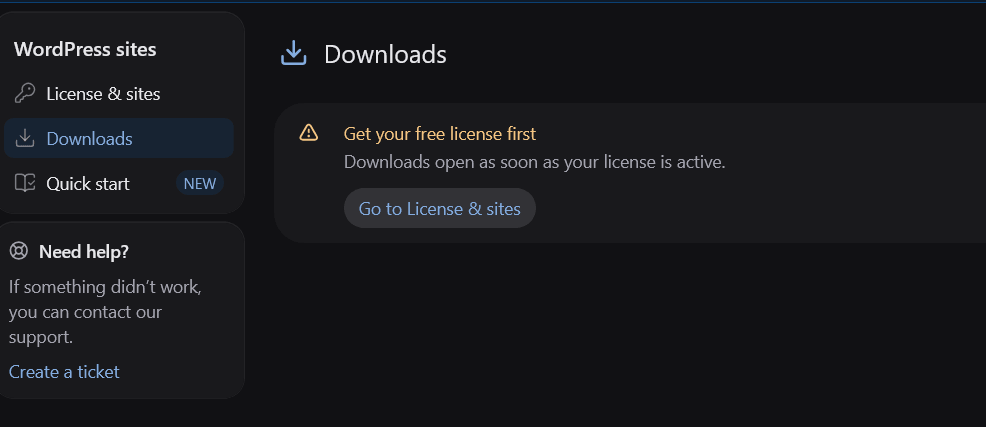
- Downloads, where you download the plugin, the themes and the add-ons.
- Quick start, a step-by-step setup guide in English and Russian.
What the Plugin Actually Does
The core plugin is called VideoTube Pro. It turns a normal WordPress installation into a video site, and the VideoTube theme gives it the look you’d expect from one: thumbnails, video pages, categories and so on.
The important part is where the videos live. They stay on MoneyPlatform, not on your hosting. Your server only runs the website itself, which is why a cheap shared hosting plan is enough to get started.
Then there’s the add-on that makes the whole thing interesting: K2S Autoposter. It takes the files you have on MoneyPlatform and publishes them on your site automatically. You don’t have to create a post for every video by hand, which is the part that normally eats up most of the time when you run a site like this.
How It Makes Money
If you’ve ever shared K2S links on a forum or blog, you already know the basic idea.
- You upload your videos to MoneyPlatform.
- The autoposter publishes them on your WordPress site.
- A visitor finds a video on your site and starts watching.
- Without a premium account, they only get a short preview. To watch the full video, they need Keep2Share Premium.
- When they buy premium, you earn a share of the sale.
MoneyPlatform pays partners up to 75% of sales revenue, which is a very high rate compared to most affiliate programs. The exact amount depends on the type of sale, so check the current terms in your dashboard. If you’re new to how earnings work on K2S, our guide on earning money with Keep2Share covers the basics.
What I like about this setup is that the site does the selling for you. Visitors who already have premium can watch everything right away, and everyone else sees exactly what they get by upgrading.
The Free License
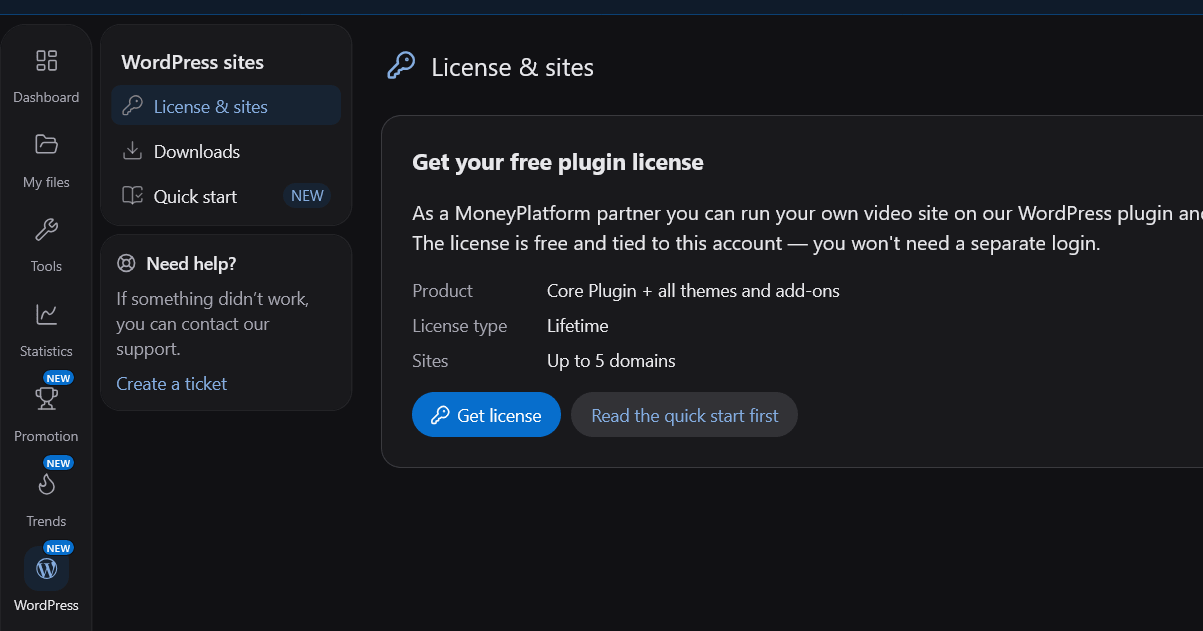
The license doesn’t cost anything if you’re a MoneyPlatform partner. It’s tied to your account, so there’s no extra login to manage.
- Product: Core plugin plus all themes and add-ons
- License type: Lifetime
- Sites: Up to 5 domains
Five domains is more than enough to test a couple of niches and see which one works best.
What You Need Before You Start
- A domain. Short and easy to remember works best. Skip hyphens and numbers.
- Hosting. Shared hosting with one-click WordPress installation is fine for your first site. A VPS only makes sense once your traffic grows or you run several sites.
- PHP 8.1 or later and a free SSL certificate. Most hosts offer both.
- At least 10 GB of storage. Again, the videos stay on MoneyPlatform.
Expect to spend around $3–10 a month on the domain and hosting together. One thing to check before you pay: make sure your registrar and hosting provider allow the type of content you plan to publish.
Setting It Up, Step by Step
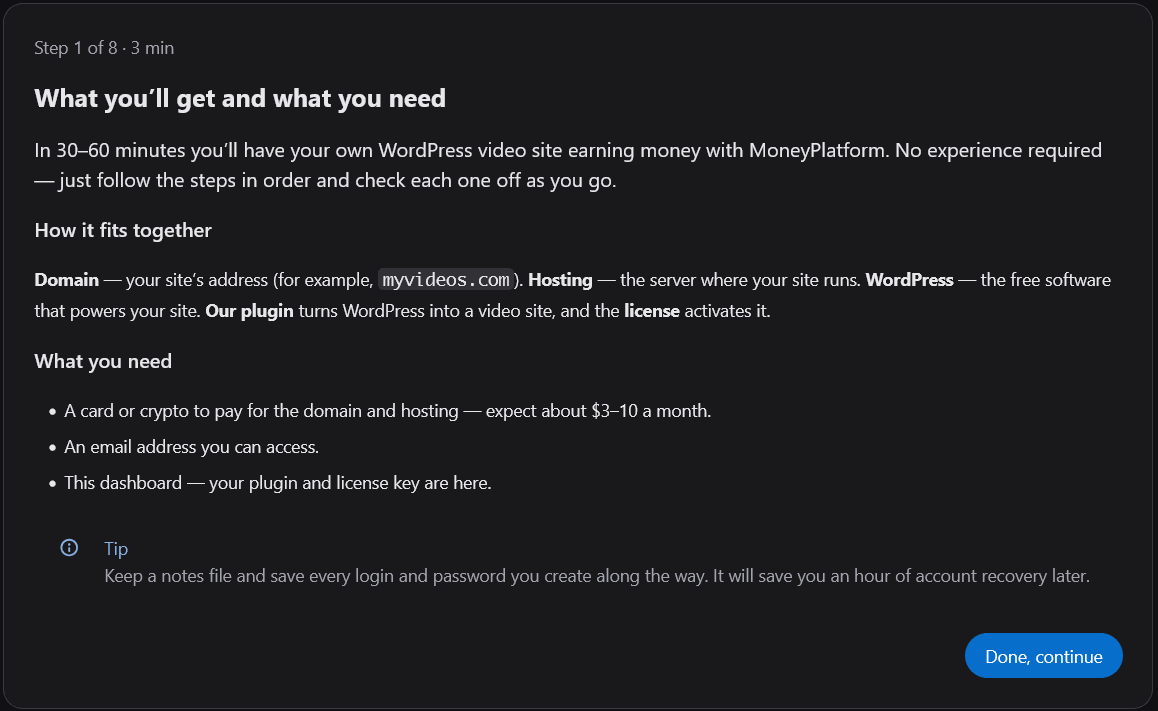
The Quick start guide in the dashboard splits the setup into 8 steps and says it takes 30–60 minutes. That’s realistic, as long as you don’t count the time DNS takes to update. Here’s the short version:
- Buy a domain. At checkout, the only add-on worth taking is WHOIS privacy.
- Choose hosting. Shared hosting for your first site, VPS later if you need it.
- Connect the domain. Add the domain in your hosting panel, then enter the host’s nameservers at your registrar. This can take anywhere from 15 minutes to 24 hours, so don’t panic if the site doesn’t load right away.
- Install WordPress. Use your host’s one-click installer. Pick a username other than “admin” and turn on SSL.
- Get your license. In the MoneyPlatform dashboard, go to WordPress → License & sites. Downloads only open once the license is active.
- Download the files. From the Downloads section, get the Core Plugin (required), the VideoTube theme and, optionally, K2S Autoposter. Don’t unzip them, WordPress needs the original .zip files.
- Install the plugin and theme. Plugins → Add New Plugin → Upload Plugin for the plugin, Appearance → Themes → Upload Theme for the theme. A VideoTube item will appear in the WordPress menu.
- Activate the license. Copy your key from License & sites, then paste it under VideoTube → License in WordPress.
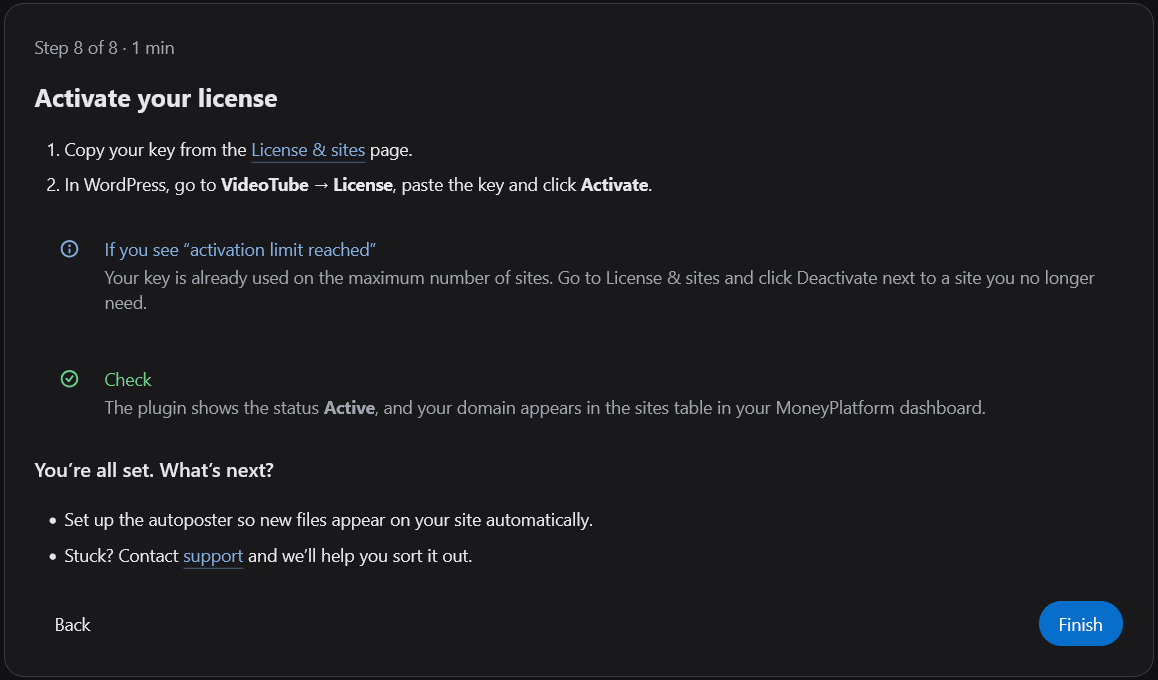
Once the plugin shows as Active, your domain also appears in the sites table in your MoneyPlatform dashboard. The last thing to do is set up the autoposter so new files start showing up on your site.
Inside the WordPress Dashboard
Once everything is installed, three new items show up in the WordPress menu: Videos, VideoTube Pro and K2S AutoPoster. Most of the work happens in the last two.
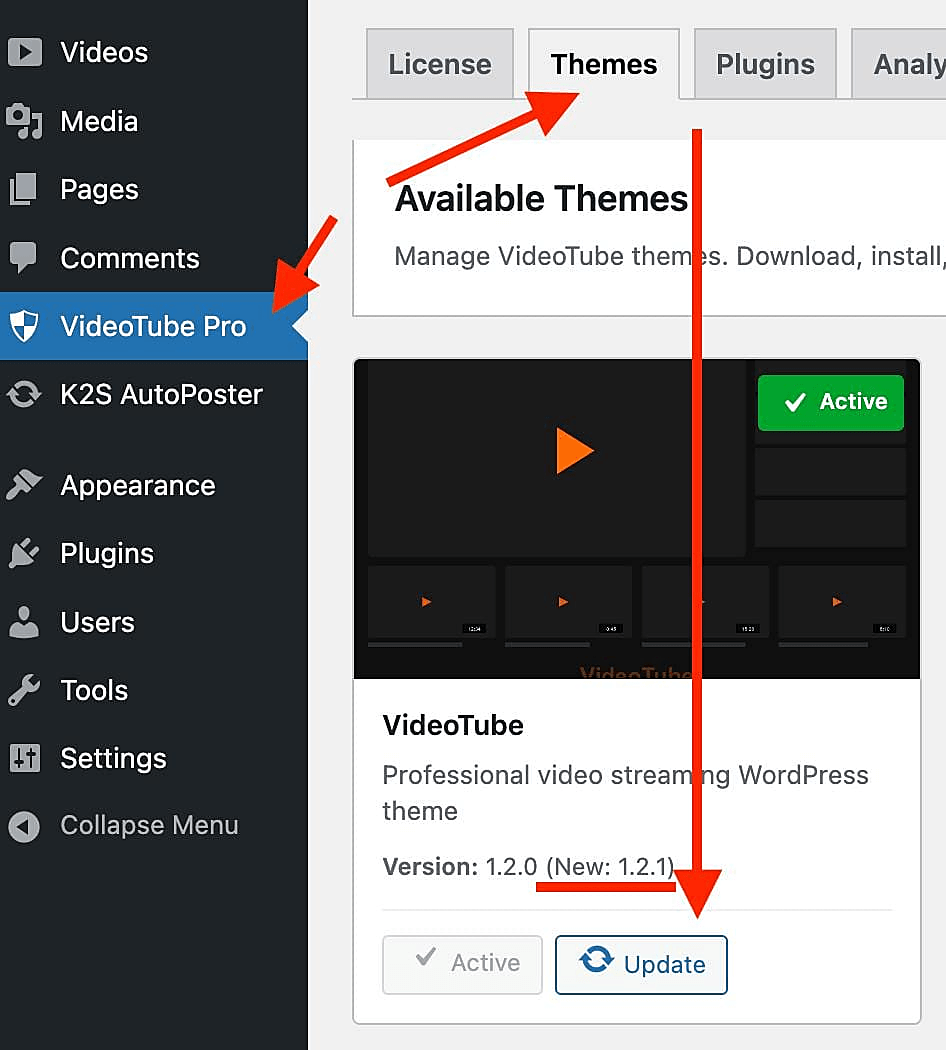
VideoTube Pro is the control center. It has its own tabs for License, Themes, Plugins, Analytics, Settings, SEO Checklist, Content Slots and Documentation. Themes are managed from here too, so when a new version of VideoTube comes out, you’ll see the update right in the theme card and can install it with one click.
K2S AutoPoster
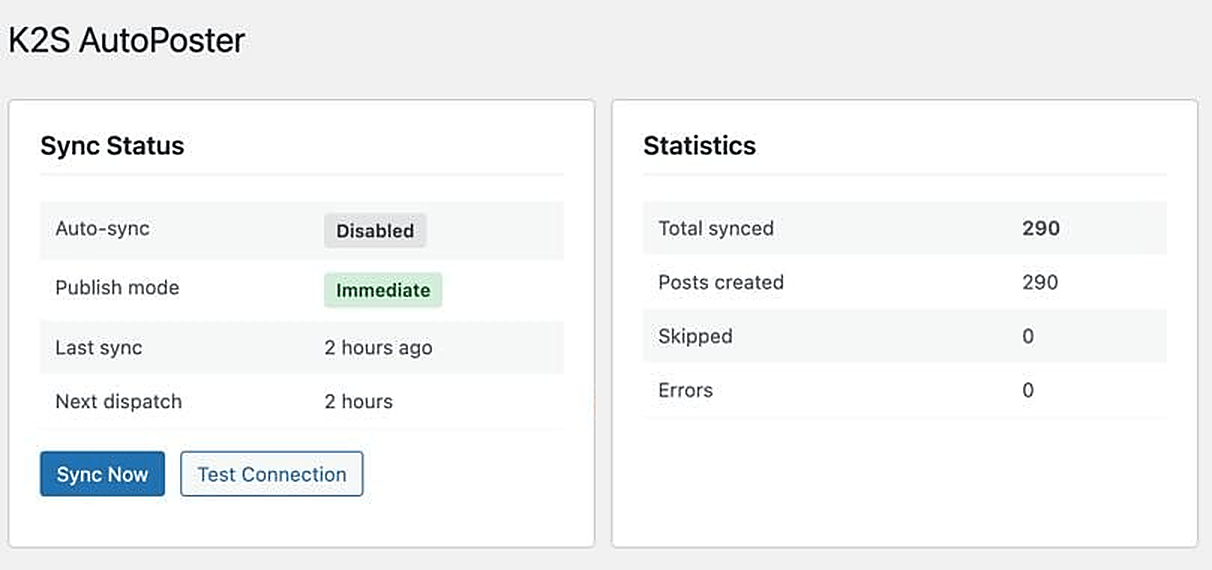
This is the screen I’d keep an eye on. It shows whether auto-sync is on, how new posts are published, when the last sync ran and when the next one is due. If you don’t want to wait, Sync Now pulls your files right away, and Test Connection checks that the plugin can reach your MoneyPlatform account.
The statistics box tells you how it’s going. On the site in the screenshot, the autoposter had synced 290 files and turned every one of them into a post, with zero errors and nothing skipped. Doing that by hand would take days.
Built-in SEO Tools

I didn’t expect this part. Under Settings, the plugin has tabs for Thumbnails, SEO, Google Indexing, GSC Issues and Sitemaps. A video site with hundreds of posts lives or dies by how well Google indexes it, so having these in one place is a real plus.
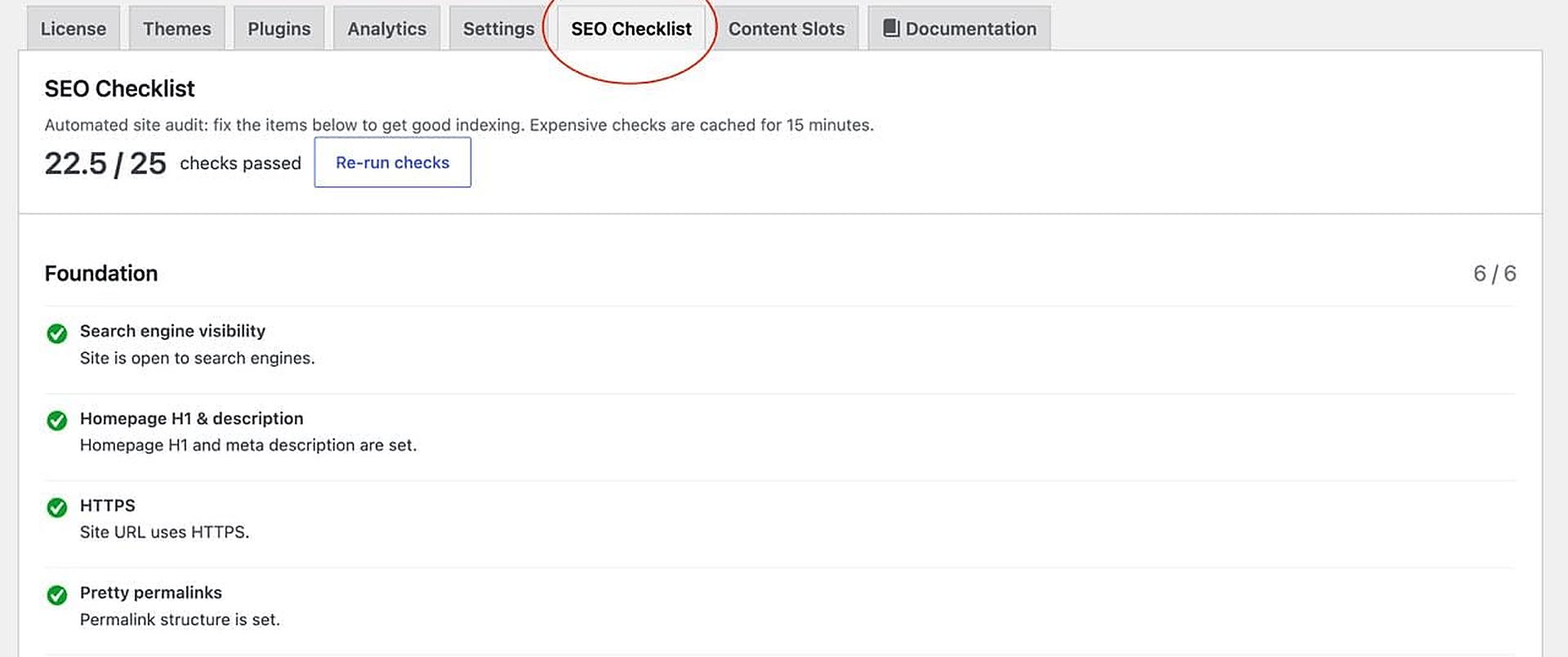
There’s also an SEO Checklist that audits your site automatically and gives you a score, checking things like search engine visibility, your homepage title and description, HTTPS and permalinks. Fix whatever it flags and run the check again. It’s a simple way to make sure a fresh site isn’t missing something basic before you start driving traffic to it.
A Few Things Worth Knowing
The plugin is still new, and the team clearly treats it as a priority, so updates come out quickly. Version 1.13.1 of the core plugin, for example, came with a long list of fixes, so it’s worth keeping everything up to date.
The autoposter uses AI. The latest version of K2S Autoposter supports two AI providers, NVIDIA and OpenRouter, to help prepare your posts. It only uses the free AI models and never the paid ones, so you won’t get a surprise bill. NVIDIA’s API is free but asks for phone verification, while OpenRouter gives you higher limits once you add $10 of credit, which is plenty for one or two sites.
If the “Download Video” button shows a 404. This can happen after an update. Go to Settings → Permalinks in WordPress and click Save without changing anything. That’s it.
One more tip if you already run an older video site: don’t install the plugin on it straight away. Try it on a new, clean WordPress installation first, and only move an existing site once you understand how the plugin and theme work.
If you get an upload error. A message about upload_max_filesize means your host’s upload limit is too low for the plugin file. Raise it to 64M in your hosting panel’s PHP settings, or ask your host to do it.
Is It Worth Trying?
If you already upload to Keep2Share, I’d say yes. And if you’re just getting started, our complete guide to making money with Keep2Share is a good place to begin. The license is free, the hosting costs are low, and the plugin handles the part that used to take the most work. You’re basically adding a second sales channel for files you already have.
Don’t expect it to make money on autopilot, though. Your site still needs traffic, and that means picking a niche, giving it a bit of time and keeping an eye on what works. But as a starting point, a ready-made video site that’s built to sell Keep2Share Premium saves you a lot of work. If you don’t have an account yet, sign up for MoneyPlatform and grab your free license from the WordPress section.
Frequently Asked Questions
Is the MoneyPlatform WordPress plugin free?
Yes. MoneyPlatform partners get a free lifetime license that covers the core plugin, all themes and add-ons on up to 5 domains.
Do I need to host the videos myself?
No. The videos stay on MoneyPlatform. Your hosting only runs the WordPress site, so you don’t need much storage or bandwidth.
Can visitors watch the videos on my site?
Visitors with a Keep2Share Premium account can watch the full videos. Everyone else gets a short preview, and they need premium to see the rest. Visitors who buy a yearly plan can also get up to 37 bonus days with our Keep2Share promo code.
How much can I earn?
MoneyPlatform pays up to 75% of sales revenue, depending on the type of sale. How much you actually earn comes down to your traffic and how well your videos convert.
Where do I get help if something doesn’t work?
Use the “Create a ticket” link in the MoneyPlatform dashboard. The support team handles plugin questions too.
28