 Keep2share - K2s
Why Your Keep2Share Downloads Are Slow and How to Improve Them
Large downloads should not take longer than necessary. Yet many users notice that downloading files from Keep2Share can sometimes be slower than expected. While internet speed is an important factor, it is rarely the only reason behind slow download performance.
Understanding what affects download speed can help you achieve a faster and more reliable downloading experience.
Internet Speed Is Only One Piece of the Puzzle
Even users with high-speed fiber connections occasionally experience slower downloads. This is because download performance depends on several factors working together.
- Network congestion during busy hours
- Distance from the download server
- Wi-Fi signal quality
- Background applications consuming bandwidth
- The type of Keep2Share account being used
Check Your Local Network First
Before assuming there is a problem with the hosting service, test your own connection.
- Restart your router.
- Pause cloud backups and streaming services.
- Use an Ethernet cable instead of Wi-Fi when possible.
- Download only one large file at a time if your connection is unstable.
Free vs Premium Experience
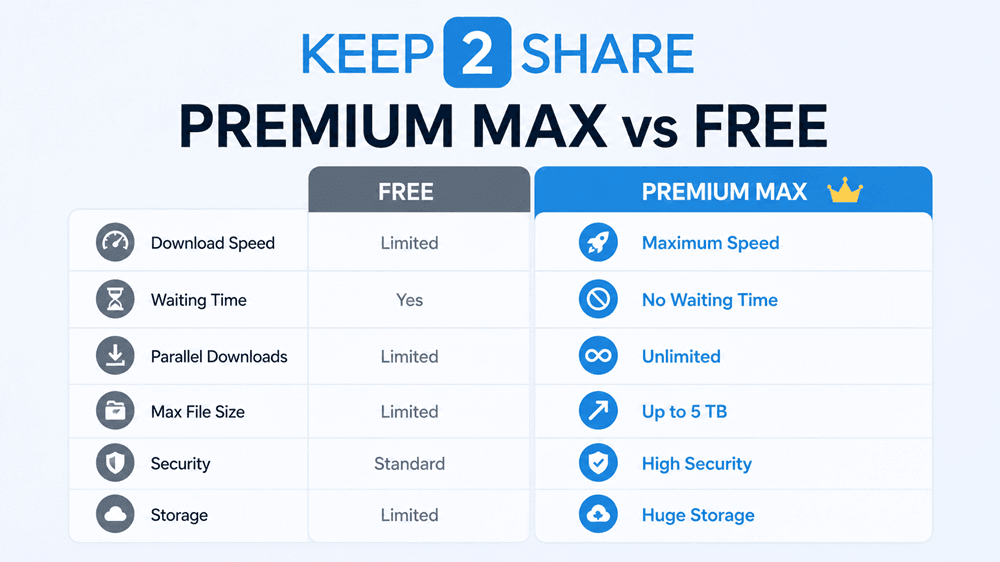
Many file hosting services, including Keep2Share, offer different experiences depending on the account type. Premium users typically benefit from higher download speeds, fewer waiting periods, and a smoother overall downloading process.
For people who download large archives, videos, or software packages on a regular basis, premium access can significantly reduce the total download time.
Compare Premium Plans: https://keep2share.com.tr/keep2share-premium-subscription-plans/
Choose the Right Time to Download
Internet traffic varies throughout the day. Downloading very large files during off-peak hours may provide a more consistent connection, particularly if your ISP experiences heavy evening traffic.
Keep Your Browser Updated
Modern browsers include performance improvements and security updates that can help maintain stable downloads. Using outdated software may introduce compatibility issues or unnecessary interruptions.
Avoid Running Multiple Heavy Tasks
Video streaming, online gaming, large cloud synchronizations, and operating system updates all compete for bandwidth. Closing unnecessary applications allows your download to use more of your available internet speed.
Who Benefits Most from Premium Downloads?
- Video editors downloading large media files.
- Photographers transferring RAW image collections.
- Developers downloading software packages.
- Remote teams exchanging project archives.
- Users who download multiple large files every week.
Frequently Asked Questions
Does a faster internet connection always mean faster downloads?
Not necessarily. Download speed also depends on network quality, server conditions, and account limitations.
Can Wi-Fi reduce download performance?
Yes. Weak wireless signals, interference, or long distances from the router can all reduce transfer speeds.
Is Premium useful for frequent downloads?
Users who regularly download large files often find premium access more convenient because it minimizes waiting time and improves overall download efficiency.
Conclusion
Slow downloads are not always caused by your internet provider. Optimizing your local network, reducing background traffic, and choosing the appropriate account type can greatly improve your Keep2Share downloading experience. Small improvements in your setup can save hours over the course of many large downloads.
224