 Keep2share - K2s
How to Create a Keep2Share / K2S Account – Step-by-Step Guide
Creating a Keep2Share account takes less than a minute. Whether you visit Keep2Share.cc or K2S.cc, you will be using the same file hosting service. Both domains lead to the same platform, allowing you to create a free account and start using Keep2Share immediately.
In this guide, we’ll show you how to create a free Keep2Share account using either your email address or your Google account.
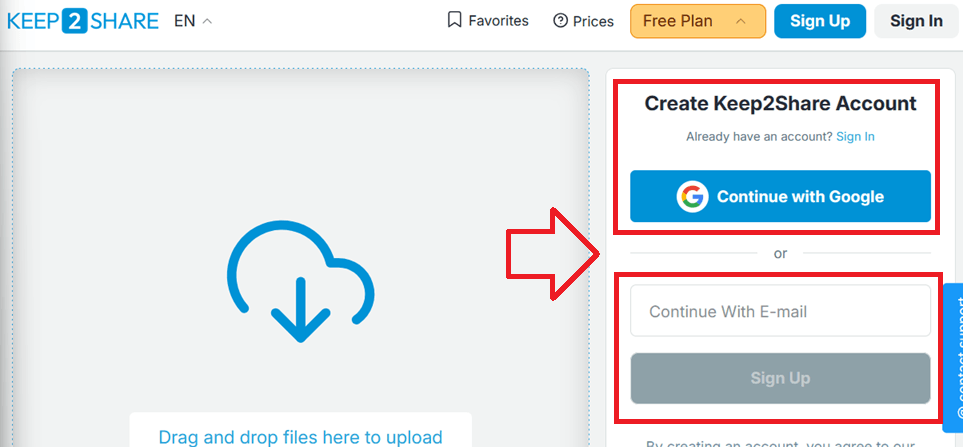
Step 1 – Open the Registration Page (Homepage)
Visit either Keep2Share.cc or K2S.cc. Both websites are identical and allow you to register a new account.
On the registration page, you’ll have two options:
- Create an account using your Google account.
- Create an account using your email address.
Simply choose the method you prefer and continue with the registration process.
Step 2 – Complete Registration
After signing in with Google or registering with your email address, your free Keep2Share account will be created automatically.
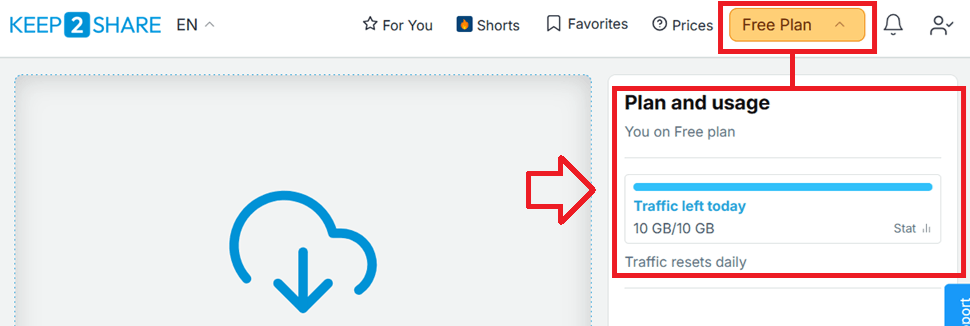
Every new free account includes:
- Free Keep2Share account
- Daily traffic limit of 10 GB
- Access to your personal account dashboard
- Ability to upgrade to Premium at any time
If you registered using your email address, Keep2Share may ask you to verify your email before you can use all account features. Simply open the verification email and follow the confirmation link.
If you signed up with your Google account, you can manage your account settings by visiting your profile page. From there, click the Verify button to complete your account verification if requested.
Profile Page:
- Create an account in less than one minute.
- Sign up using Google or your email address.
- 10 GB of free daily traffic.
- Secure cloud storage.
- Manage your account from the profile page.
- Upgrade to Premium whenever you need faster downloads and additional features.
Explore premium plans: https://keep2share.com.tr/keep2share-premium-subscription-plans/
Email Verification
Users who register with an email address may receive a verification email. Verifying your email helps secure your account and ensures you can access all available features.
Google users can also verify their account through the Profile page by clicking the Verify button if verification is requested.
Frequently Asked Questions
Yes. Both domains belong to the same Keep2Share service. You can register and sign in using either website.
Can I sign up with Google?
Yes. Keep2Share supports quick registration using your Google account.
Can I create an account using my email?
Yes. Simply enter your email address on the registration page and complete the verification email if requested.
Yes. Every user can create a free account that includes up to 10 GB of daily traffic.
Where can I manage my account?
After logging in, visit your profile page to manage your account settings and complete verification if needed.
Conclusion
Creating a Keep2Share account is simple and only takes a few moments. Whether you choose to register with your Google account or your email address, you’ll immediately receive a free account with 10 GB of daily traffic. If required, complete the verification process from your email or through the Profile page to unlock all account features. If your free plan limits are insufficient, be sure to consider Premium, Premium Pro, or Premium Max plans. These plans offer higher data quotas and include dozens of features such as watching videos without downloading, using a download manager, ad-free access, and access to partner sites.
180